
A growing collection of websites I’ve found genuinely useful. Most are free, some are paid, and all are here because they solved a problem for me.
Graphics & Images
Photopea
Website: https://www.photopea.com
Category: Graphics • Images • Design
Jindai Rating: ⭐⭐⭐⭐☆
Photopea is a browser-based image editor that works a lot like Photoshop. It can open PSD files, handle layers, edit both raster and vector graphics, and export to a wide variety of image formats—all without requiring an Adobe subscription or even installing software.
Why it’s in my toolbox
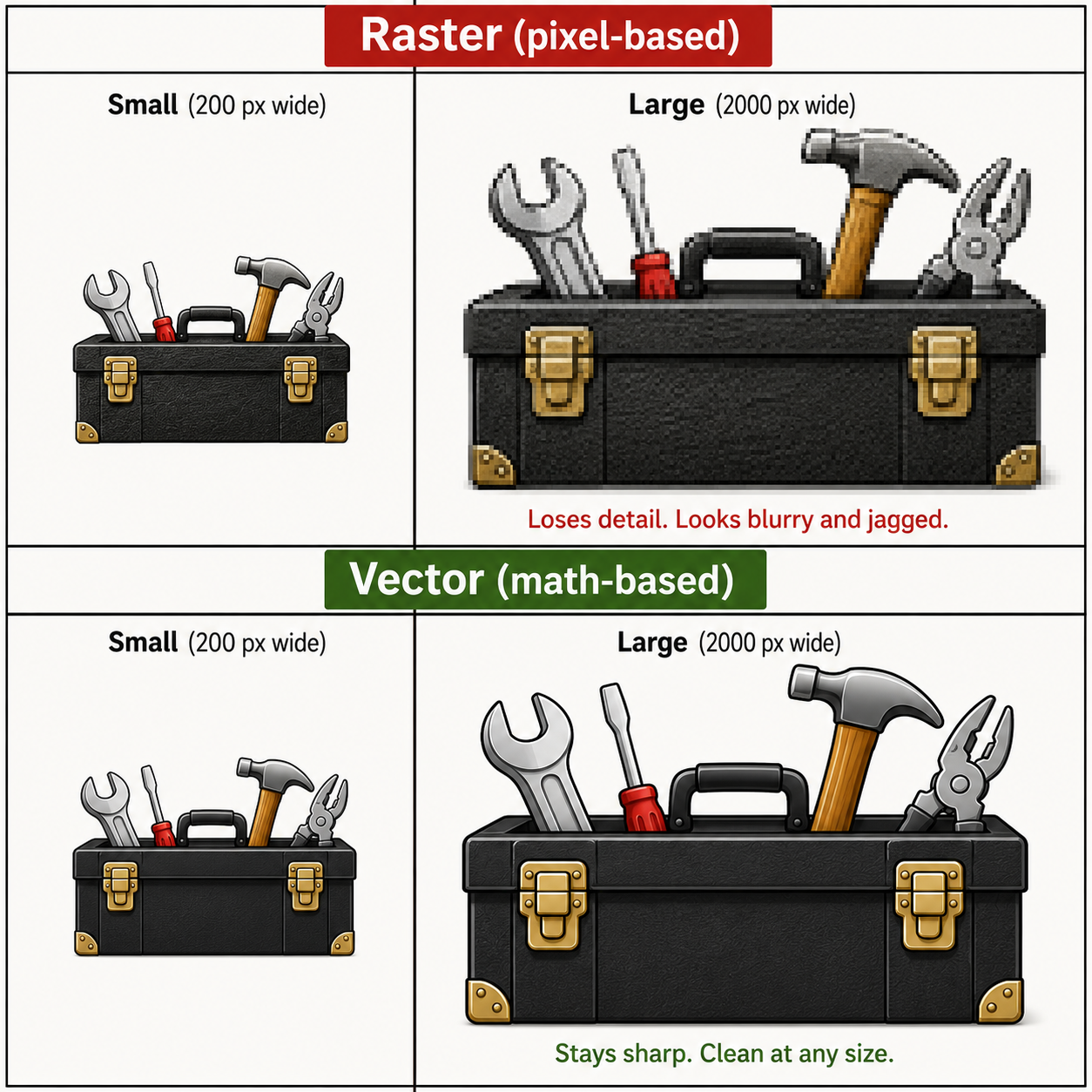
Most images on the web are made of pixels. If you make them much larger than they were meant to be, they eventually become blurry and jagged. Vector graphics work differently. They’re built from mathematical shapes instead of individual pixels, so they can be scaled from the size of a postage stamp to the side of a building while staying perfectly sharp.
I don’t need vector graphics every day, but when I do, they’re incredibly useful—especially for logos, icons, diagrams, and artwork that might need to be resized later. Finding software that works well with vectors often means paying for an expensive design package. Photopea gives me that capability right in the browser, along with Photoshop-compatible editing, without requiring an Adobe subscription.
Things I like
- Runs in the browser.
- Opens PSD files.
- Supports layers and advanced image editing.
- Good emergency Photoshop substitute.
Things to know
- The interface can feel dense at first.
- Browser performance depends on the size of the file.
Last Reviewed
June 25, 2026
Remove.bg
Website: https://www.remove.bg
Category: Images • Background Removal • Graphics
Jindai Rating: ⭐⭐⭐⭐☆
Remove.bg automatically removes the background from images using AI. If you’ve used the recent versions of Apple Photos where you can tap and hold a subject to lift it away from the background, it’s a very similar idea—but designed as a standalone web tool.
Why it’s in my toolbox
Sometimes I don’t want to spend ten minutes carefully tracing around an object in an image just to make a quick graphic. Remove.bg can often produce a surprisingly good cutout in seconds.
It’s especially handy for blog graphics, thumbnails, mockups, or anytime I want to place a person or object onto a different background without opening a full-featured image editor.
Things I like
- Very fast.
- Good for simple background removal.
- Useful for blog graphics and mockups.
Things to know
- It does an impressive job, but very fine details—like wisps of hair, fur, or transparent objects—may still need a little manual cleanup.
- Higher-resolution downloads may require credits or payment.
Last Reviewed
June 25, 2026
Squoosh
Website: https://squoosh.app
Category: Images • Compression • WordPress
Jindai Rating: ⭐⭐⭐⭐⭐
Squoosh compresses and converts images directly in your browser, letting you dramatically reduce file sizes while keeping surprisingly good image quality.
Why it’s in my toolbox
Every so often I run into a website that refuses an image because the file is too large. I could open an image editor, resize it, save another copy, and play the guessing game until it’s small enough… or I can drag it into Squoosh and usually solve the problem in under a minute.
The best part is that it often produces a much smaller file with little or no noticeable loss in quality. It’s become one of those utilities I forget exists—until I suddenly need it, and then I’m glad I bookmarked it.
Things I like
- Drag-and-drop simple.
- Excellent file size reduction.
- Usually keeps image quality surprisingly high.
- No software installation required.
Things to know
- You still have to check image quality after compression.
- Too much compression can make images ugly.
Last Reviewed
June 25, 2026
Software & Utilities
AlternativeTo
Website: https://alternativeto.net
Category: Software • Research • Free Alternatives
Jindai Rating: ⭐⭐⭐☆☆
AlternativeTo is a search-and-suggestion site for finding modern alternatives to software, apps, and web services. Start typing the name of something you already know, and it autocompletes possible matches, which makes it easier than guessing the exact title.
The catch: it seems much better with current or still-remembered software than with older legacy programs. My test case, Picture Publisher, failed completely. So this is useful when you want “what’s like this now?” but not necessarily when you’re trying to track down every great program from the ancient software shelf.
Best for: finding current replacements for apps and services.
Not for: obscure or legacy software archaeology.
Why it’s in my toolbox
Useful when a program gets too expensive, turns into a subscription, or simply stops being what it used to be.
Things I like
- Great for finding software alternatives.
- Includes user recommendations.
- Helpful when avoiding subscription traps.
Things to know
- Popular does not always mean best.
- Some listings may be outdated.
Last Reviewed
June 25, 2026
TinyWow
Website: https://tinywow.com
Category: Utilities • PDFs • Images • Video
Jindai Rating: ⭐⭐⭐⭐☆
TinyWow is a whole suite of quick web tools for file conversion, image work, PDFs, writing utilities, and other little “I just need this fixed once” jobs. It is especially handy when you run into a format problem, like having an AVIF or HEIC image that some service refuses to accept, and you just need to turn it into a JPG without installing anything.
Because it does so many different things, not every tool on the site is the absolute best version of that specific tool. The strength of TinyWow is convenience. Most of the tools are good, some are very good, and the site is often the fastest answer when you have a small file problem and don’t want to go hunting for a dedicated app.
Best for: quick conversions, one-off file fixes, PDF/image utility jobs, and “why won’t this upload?” problems.
Not for: specialist work where a dedicated tool gives better control or higher-quality results.
Why it’s in my toolbox
TinyWow is a Swiss Army knife site for random file problems. Sometimes you don’t need the perfect specialist tool. You just need to convert this thing, compress that thing, fix one more thing, and move on with your life. TinyWow lets you do a lot of those little utility jobs in one place.
Things I like
- Many tools in one place.
- Useful for quick conversions and edits.
- No software install needed.
Things to know
- Because it does so many things, some tools may be better than others.
- Be careful with sensitive files on any online converter.
Last Reviewed
June 25, 2026
Excalidraw
Website: https://excalidraw.com
Category: Diagrams • Planning • Flowcharts
Jindai Rating: ⭐⭐⭐☆☆
Excalidraw is a browser-based drawing tool for diagrams, flowcharts, wireframes, maps, and visual planning. It has a loose hand-drawn look, which makes it feel less stiff than a formal diagramming app.
It is not always intuitive at first. You can absolutely open it and start drawing boxes, arrows, and notes, but some of the better features take a little figuring out. Where it really shines is when you already have a basic understanding of process, structure, or flowcharting. If you know what you are trying to map, Excalidraw can help you turn that idea into something visual very quickly.
For this Toolbox page, I used Excalidraw to map the page structure itself: sections, tools, and how everything fits together.
Why it’s in my toolbox
Because sometimes a list is not enough. Excalidraw helps turn an idea, process, website structure, or project plan into something I can actually see.
Best for: flowcharts, site maps, process diagrams, project planning, quick visual thinking, and rough mockups.
Not for: fully polished design work, automatic magic diagrams, or people who expect the tool to understand the process for them.
Things I like
- Runs in the browser.
- Great for quick diagrams and maps.
- Hand-drawn style keeps things from feeling too corporate.
- Useful once you understand the structure you want to show.
Things to know
- Not perfectly intuitive at first.
- Works best if you already understand basic flowcharting or process mapping.
- Some layouts still need manual cleanup.

Last Reviewed
June 25, 2026
Research & Reference
Archive.org / Internet Archive
Website: https://archive.org
Category: Research • History • Internet Archive
Jindai Rating: ⭐⭐⭐⭐⭐
Archive.org is one of the great “wait, this still exists?” sites on the internet. It is home to the Wayback Machine, which archives old websites, but it also stores books, magazines, audio, video, software, and all kinds of odd little pieces of history that would otherwise just vanish.
This one is personal for me. I found my own 90s website there and was able to restore it. Yes, the archived pages had a lot of injected code and cleanup weirdness, but I am not quibbling. The fact that it existed at all was amazing.
Even better, I found my grandmother’s short stories in old scanned magazines from the 1950s and 1960s. That moves Archive.org from “useful research site” to “holy crap, this matters.”
Best for: old websites, scanned magazines, public-domain books, vintage media, software history, and period research.
Not for: clean modern copies. Archived web pages can include broken links, missing images, injected code, and general internet archaeology dust.
Why it’s in my toolbox
The internet forgets things. Archive.org often remembers them. Sometimes it even remembers things you thought were gone forever.
Things I like
- Wayback Machine for old or deleted webpages.
- Huge collection of public digital material.
- One of the most important preservation projects online.
Things to know
- Not every page is archived.
- Some captures are incomplete or broken.
Last Reviewed
June 25, 2026
ManualsLib
Website: https://www.manualslib.com
Category: Manuals • Reference • Repairs
Jindai Rating: ⭐⭐⭐⭐☆
ManualsLib is exactly what it sounds like: a giant library of manuals. If you have some old, obscure, discontinued, secondhand, or just plain weird piece of tech, there is a decent chance somebody has uploaded the manual there.
I used it when I got an old Sega Genesis from eBay and needed the manual. That is the kind of thing this site is great for. Not glamorous, not flashy, just incredibly useful when you need to know what a button, port, switch, warning light, or mystery setting actually does.
Best for: manuals for old electronics, appliances, tools, game systems, remotes, gadgets, and random secondhand tech.
Not for: guaranteed official copies. Quality and completeness can vary, especially with scans or older uploads.
Why it’s in my toolbox
Because sometimes the weird old thing you bought did not come with instructions, but the internet still has them.
Things I like
- Huge manual collection.
- Often has older products.
- Useful for cameras, TVs, appliances, and gadgets.
Things to know
- Some manuals may be scans of varying quality.
- Always make sure you have the exact model number.
Last Reviewed
June 25, 2026
Radio Garden
Website: https://radio.garden
Category: Entertainment • Music • Research
Jindai Rating: ⭐⭐⭐⭐☆
Radio Garden lets you spin a 3D globe and listen to live radio stations from almost anywhere on Earth. It is a surprisingly fun way to discover local music, news, sports, language, ads, accents, and culture from cities all over the world.
The first time I used it, it hit the same part of my brain as August 1981, when MTV launched and “Video Killed the Radio Star” came through on my little 9-inch TV. Different technology, same feeling: suddenly the world got bigger through a screen.
With Radio Garden, you can jump from Berlin to Tokyo to some small town you have never heard of, and for a few minutes you are not being fed another algorithmic playlist. You are just tuning in.
Why it’s in my toolbox
Sometimes you don’t want another algorithm telling you what to hear. You want to tune in to a real radio station somewhere else in the world. Radio Garden makes that incredibly easy.
Best for: live global radio, local music, language exposure, international news, sports, Eurovision-adjacent wandering, and audio time travel.
Not for: specific songs on demand. This is radio, not a jukebox.
Things I like
- Live stations from around the globe.
- Fun, interactive globe interface.
- Free to use.
- Great for discovering music and hearing local programming.
Things to know
- Some stations occasionally go offline.
- Audio quality depends on the station’s own stream.
Last Reviewed
June 25, 2026
Privacy & Security
Have I Been Pwned
Website: https://haveibeenpwned.com
Category: Security • Privacy
Jindai Rating: ⭐⭐⭐⭐⭐
Have I Been Pwned is a simple, useful breach-checking site. Enter an email address, and it tells you whether that address has appeared in known data breaches. It does not clean your data off the internet, and it does not promise to make the problem disappear. What it does is tell you whether you have been caught in a leak, so you can decide what to do next.
That matters because there are a lot of ads now trying to scare people with “your data is out there” messaging. Some of those services may be useful, some may not, but paying someone is not a guaranteed magic eraser. Have I Been Pwned gives you a clear starting point: has this email shown up in known breaches, and where?
Best for: checking whether an email address has appeared in known breaches, deciding which accounts need attention, and cutting through privacy-scare advertising.
Not for: removing your data from broker sites or guaranteeing that you are safe forever.
Why it’s in my toolbox
Because panic is not a plan. This gives you information first, so you can change passwords, turn on two-factor authentication, watch affected accounts, or decide whether a paid cleanup service is actually worth considering.
Things I like
- Simple and direct.
- Widely trusted security resource.
- Useful for checking old email accounts.
Things to know
- It does not mean your account is currently hacked.
- It means your email appeared in a known breach.
Last Reviewed
June 25, 2026
JustDeleteMe
Website: https://justdeleteme.xyz
Category: Privacy • Accounts • Security
Jindai Rating: ⭐⭐⭐⭐☆
JustDeleteMe is a directory of links and instructions for deleting accounts from different websites and services. It does not erase you from the internet, wipe your history, or let you disappear into the woods as a logger with no online presence. That is not how any of this works.
What it can do is help when you want to get rid of a specific account. If you are done with some service, tired of an old login hanging around, or really hate X and want out, JustDeleteMe can point you toward the actual delete-account process instead of making you hunt through menus, help pages, and dark-pattern nonsense.
Why it’s in my toolbox
Because deleting an account should not feel like escaping a maze. JustDeleteMe helps you find the exit door.
Best for: finding account deletion pages, cleaning up old logins, and reducing the number of services you are still attached to.
Not for: erasing your entire online presence or removing every trace of your data from the internet.
Things I like
- Direct links to deletion pages.
- Difficulty ratings.
- Good privacy cleanup tool.
Things to know
- Account deletion rules change.
- Some services may still require logging in or contacting support.
Last Reviewed
June 25, 2026
Cooking
Supercook
Website: https://www.supercook.com
Category: Cooking • Recipes • Food Waste
Jindai Rating: ⭐⭐⭐⭐☆
Supercook is built around one of the most useful kitchen questions: “What can I make with what I already have?” You tell it what ingredients are in your pantry, fridge, or freezer, and it suggests recipes that use those ingredients.
That is incredibly handy when you do not want to go shopping, or when you are staring at random food and trying to turn it into dinner. But it is not magic. If you enter M&Ms and a gallon of milk, you might get something vaguely chocolate-milk-adjacent, but it is not going to summon a full meal from nowhere.
It also assumes some basic kitchen staples, like salt and pepper, so the results work best when you give it a realistic set of ingredients instead of treating it like a cooking genie.
Why it’s in my toolbox
Because sometimes the real question is not “what recipe do I want?” It is “what can I make without leaving the house?”
Best for: pantry cooking, using up ingredients, avoiding an extra grocery trip, and finding ideas when your brain says “there is no food” even though there clearly is.
Not for: miracles, empty kitchens, or turning three nonsense ingredients into a feast. This is a recipe helper, not a cheat code for Chopped.
Things I like
- Helps use up what is already in the fridge or pantry.
- Free to use.
- Good for avoiding food waste.
Things to know
- Recipe quality depends on what it finds.
- Best when you enter a decent number of ingredients.
Last Reviewed
June 25, 2026
JustTheRecipe
Website: https://www.justtherecipe.com
Category: Cooking • Recipes • Utility
Jindai Rating: ⭐⭐⭐⭐☆
JustTheRecipe does one very specific thing: you paste in a recipe link, and it strips the page down to the actual recipe. No life story, no autoplay video, no “my grandmother first discovered cinnamon during a thunderstorm” preamble. Just the ingredients, instructions, and useful recipe parts.
This may become less necessary as browser Reader Mode and Apple’s hide-item tools get better, but JustTheRecipe is still dead simple. Enter a link, hit the button, blam: just the main recipe.
Why it’s in my toolbox
Because sometimes I do not want the whole recipe blog experience. I just want to know what goes in the pan and what temperature the oven should be.
Best for: stripping clutter from recipe pages, saving time, and getting straight to the cooking instructions.
Not for: discovering new recipes from scratch or replacing a full cooking site.
Things I like
- Removes clutter from recipe sites.
- Makes recipes easier to read.
- Great when a page is buried in ads and popups.
Things to know
- Some recipe sites may not parse perfectly.
- Works best with standard recipe pages.
Last Reviewed
June 25, 2026
Lifestyle
Sleepytime
Website: https://sleepyti.me
Category: Sleep • Lifestyle
Jindai Rating: ⭐⭐⭐☆☆
Sleepytime is a simple sleep calculator that helps you figure out when to go to bed or when to wake up based on sleep cycles. Instead of just counting raw hours, it gives you suggested times that may line up better with waking between cycles instead of in the middle of one.
The tool itself is useful, but the first thing I ran into was a chatbot that definitely seemed more interested in selling me something than helping me sleep. You can close it without engaging, and then the actual sleep calculator is easy to use. Do not try to talk your way through the chatbot to get the information. Just ignore it and use the tool.
Why it’s in my toolbox
Because sometimes “I need to be awake at this time” is easy, but “when should I actually go to bed?” is the real question.
Best for: quick bedtime/wake-up planning, sleep-cycle estimates, and avoiding the “I technically slept but woke up wrecked” problem.
Not for: medical sleep advice, diagnosing sleep problems, or having a productive conversation with the pop-up chatbot.
Things I like
- Simple idea.
- Easy to use.
- Good as a rough planning tool.
Things to know
- Sleep is not perfectly mechanical.
- Treat it as a guideline, not medical advice.
Last Reviewed
June 25, 2026